Made in South Africa

The point of sale that keeps up with your restaurant.

Take orders on tablets and phones, send them straight to the kitchen and bar, track your stock and close the day with numbers you can trust. Built for South African restaurants, cafés and bars.

Installs on a Windows PC. No payment needed to try it.
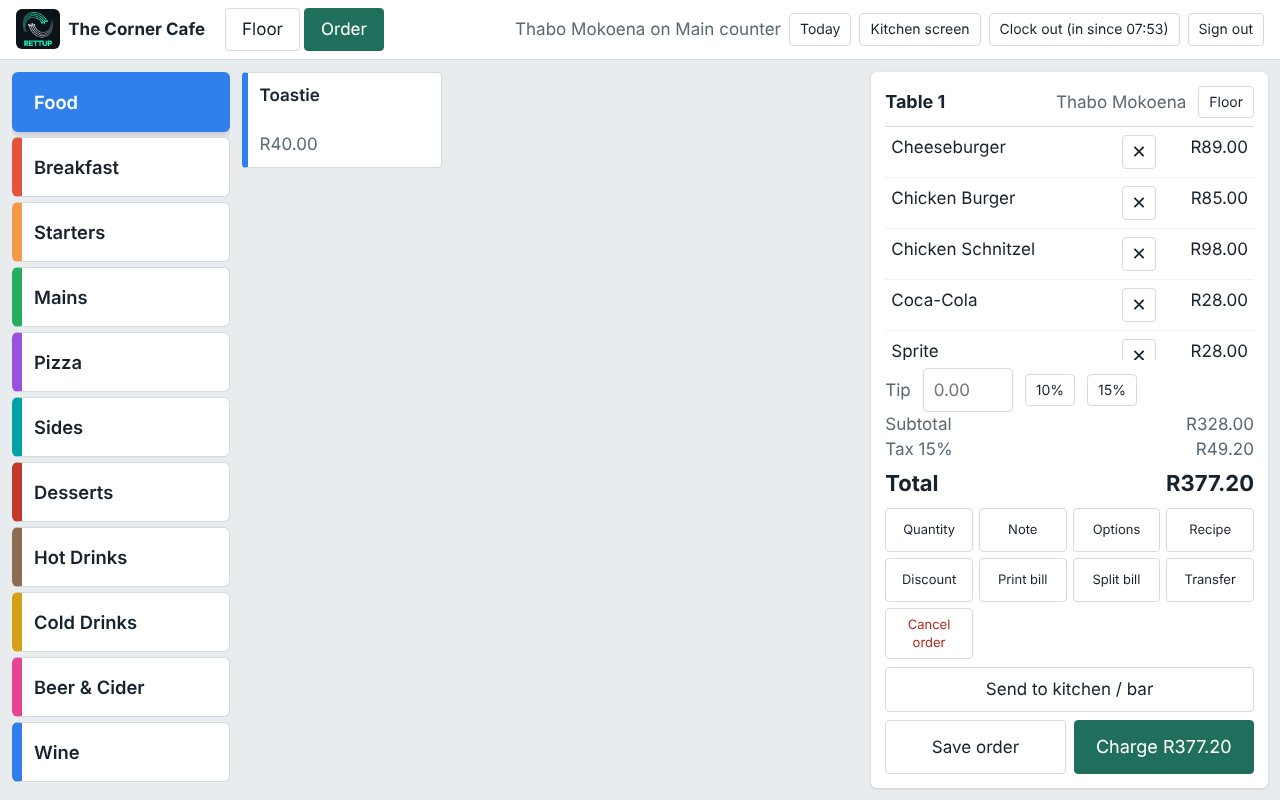
Rettup POS sales screen showing a table order with categories and a running total
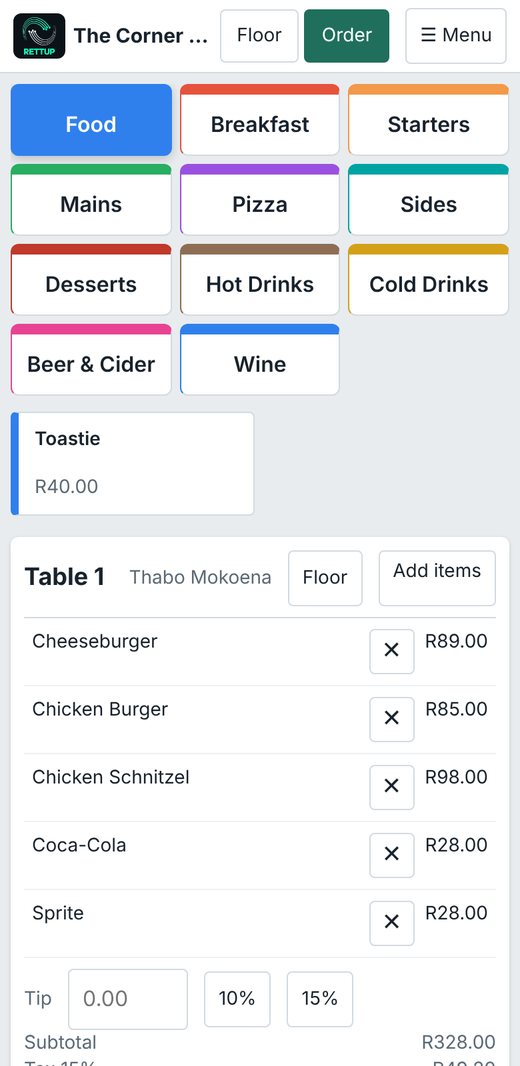
Rettup POS on a phone
Everything in one system

From the first order to the end-of-day report

Rettup POS covers the whole shift, so you are not juggling a till, a notebook and a spreadsheet.

🍽️

Tables and floor plan

Draw your venue, see which tables are open and how long they have been seated, and move, merge or split bills in a tap.

👨‍🍳

Kitchen and bar screens

Orders go to the right station the moment a waiter hits send. Staff tap Done when the food is ready.

🧾

Fast billing

Cash, card, on-account customers and split payments. Discounts, notes, item options and printed bills.

📦

Stock and recipes

Link recipes to menu items, deduct stock as you sell, record purchases and waste, and run stock counts.

📊

Reports that explain

Sales per day, per waiter, tips, cash-up, food cost, stock value and reorder lists. Save as PDF or print.

🔐

Staff control

PIN sign-in, roles and permissions, clock in and out, time sheets and a full audit trail of voids and discounts.

📶

Works offline

If the Wi-Fi goes down, waiters can keep signing in and capturing sales. Everything syncs when the connection returns.

💾

Backups and restore

Daily automatic backups, extra copies to a USB drive or network folder, and one-click restore.

🛠️

Supported by people

Updates install from Setup on the server PC, and our team can look at your system with your permission when you need help.

See it in action

A look inside Rettup POS

Real screens from the system, shown here with sample data from a test café. Click any screenshot to enlarge it.

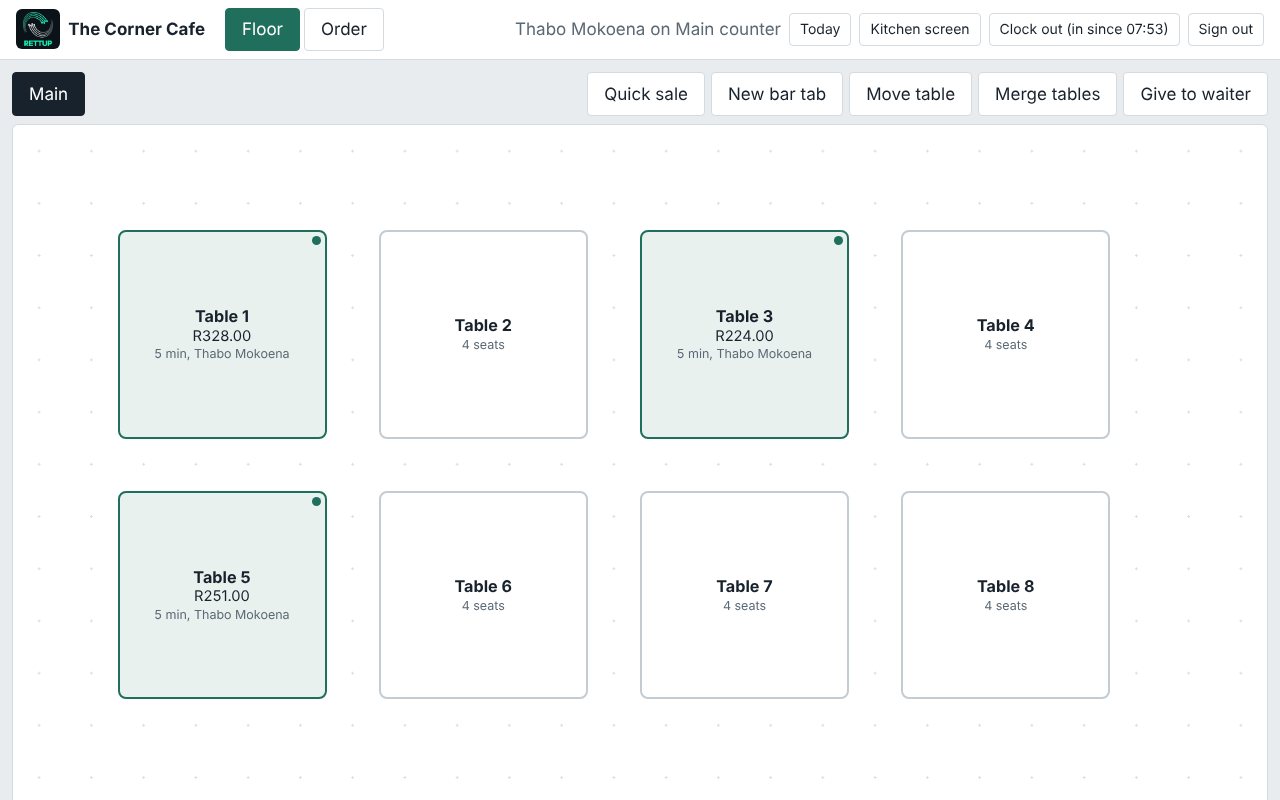
Floor plan with open tables showing totals and waiter names

See your whole floor at a glance

Open tables are highlighted with the running bill, the waiter and how long they have been seated.

  • Several areas such as Inside, Patio and Bar
  • Quick sale and bar tabs without a table
  • Move tables, merge tables or hand a table to another waiter
Order screen with colour coded categories and a bill

Big buttons, fast orders

Colour-coded categories and large touch targets mean new staff learn it in minutes.

  • Item options, notes and quantities
  • Discounts and tips with one tap
  • Send to kitchen and bar, or save the order for later
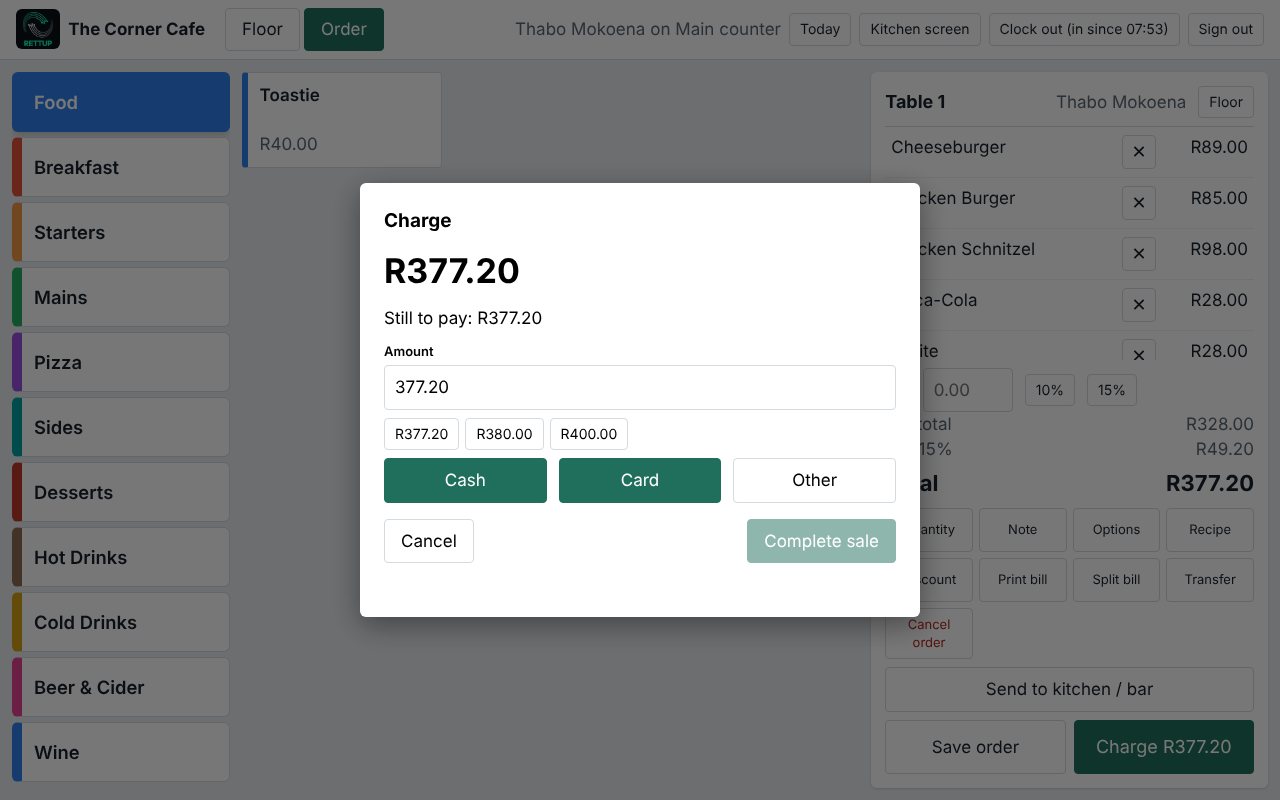
Charge dialog with cash and card buttons

Simple, flexible payment

Take cash, card or other payments, and split a bill between several people.

  • Quick amount buttons for cash
  • Charge to a customer account
  • Print or reprint the bill
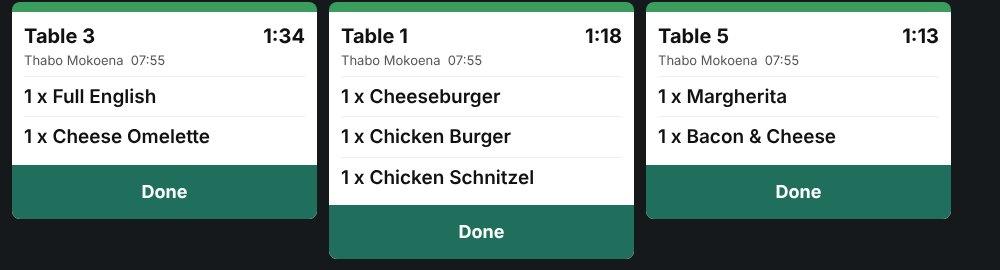
Kitchen screen with order tickets and timers

No more lost order slips

Orders appear on the kitchen screen with a timer, grouped by table. Separate stations for kitchen and bar keep each team focused.

  • Live timers on every ticket
  • Tap Done when it is ready
  • Works on any screen with a browser
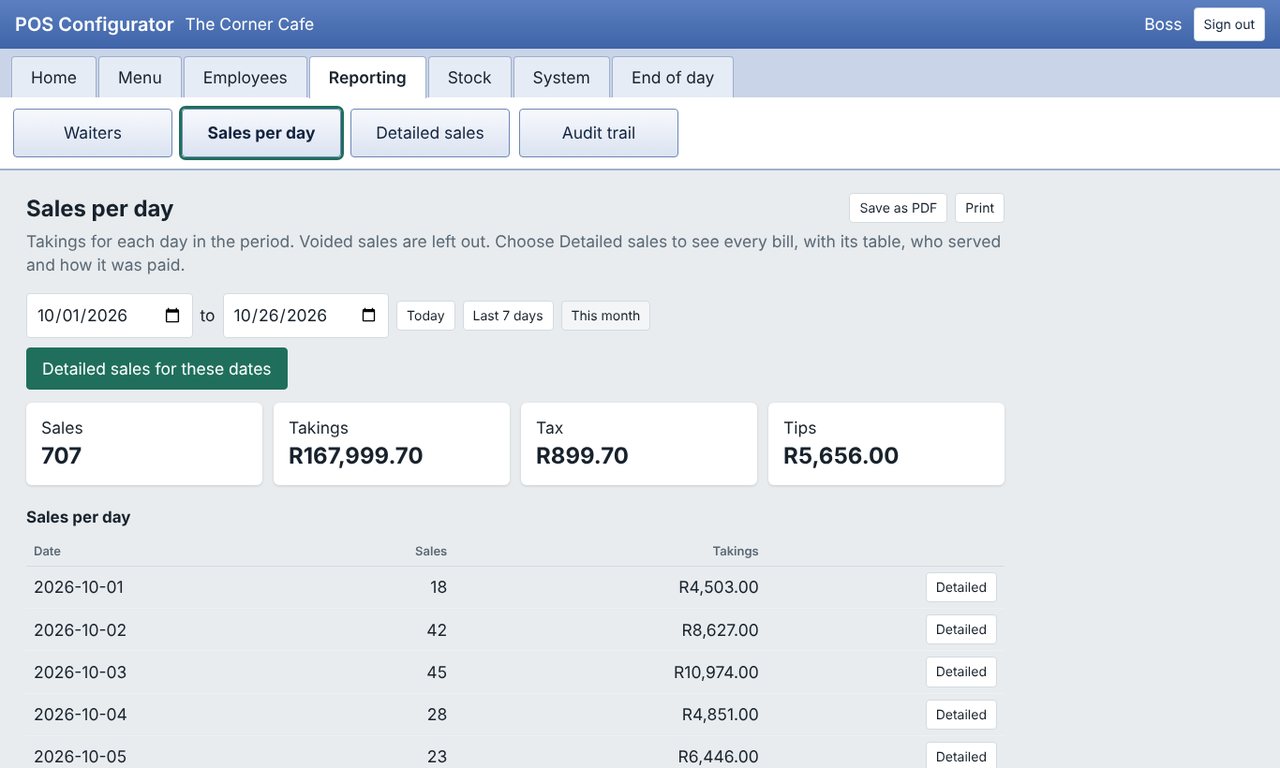
Sales per day report with takings, tax and tips

Know your numbers

Rettup POS Back Office is where you manage the business and see how it is doing, on the server PC or from another device.

  • Sales per day, per payment type and per staff member
  • Tax and tips separated out
  • Detailed sales for every bill, with who served and how it was paid
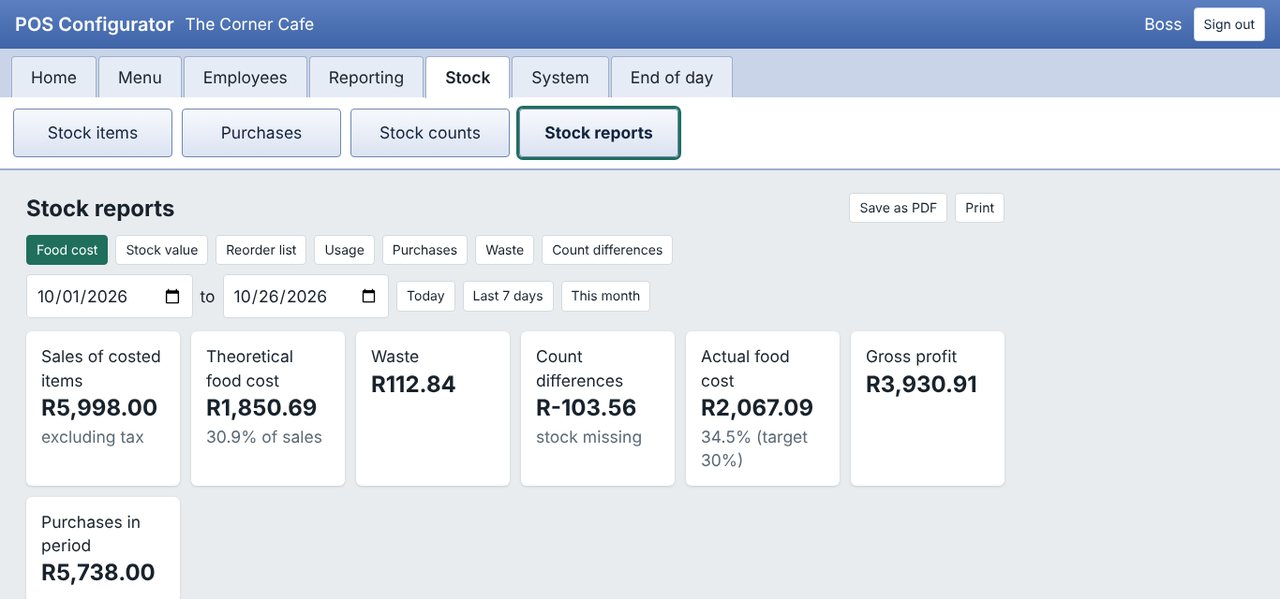
Stock reports showing theoretical and actual food cost

Find where the money leaks

Compare what your recipes say you should have used with what actually went through, including waste and count differences.

  • Theoretical and actual food cost
  • Stock value, usage and reorder lists
  • Purchases, waste and count differences
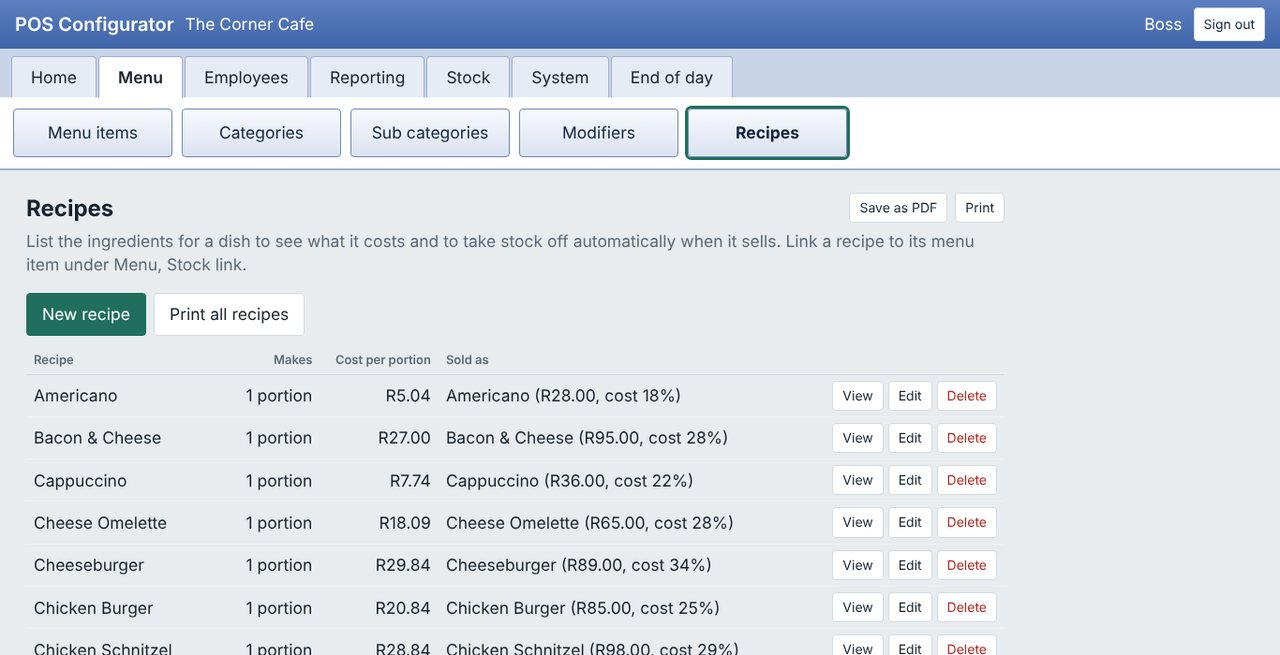
Recipe list with cost per portion

Recipes with real costs

Build each dish from stock items and see its cost per portion and cost percentage against the selling price.

  • Stock deducts automatically as you sell
  • Link recipes to menu items
  • Spot dishes that are priced too low
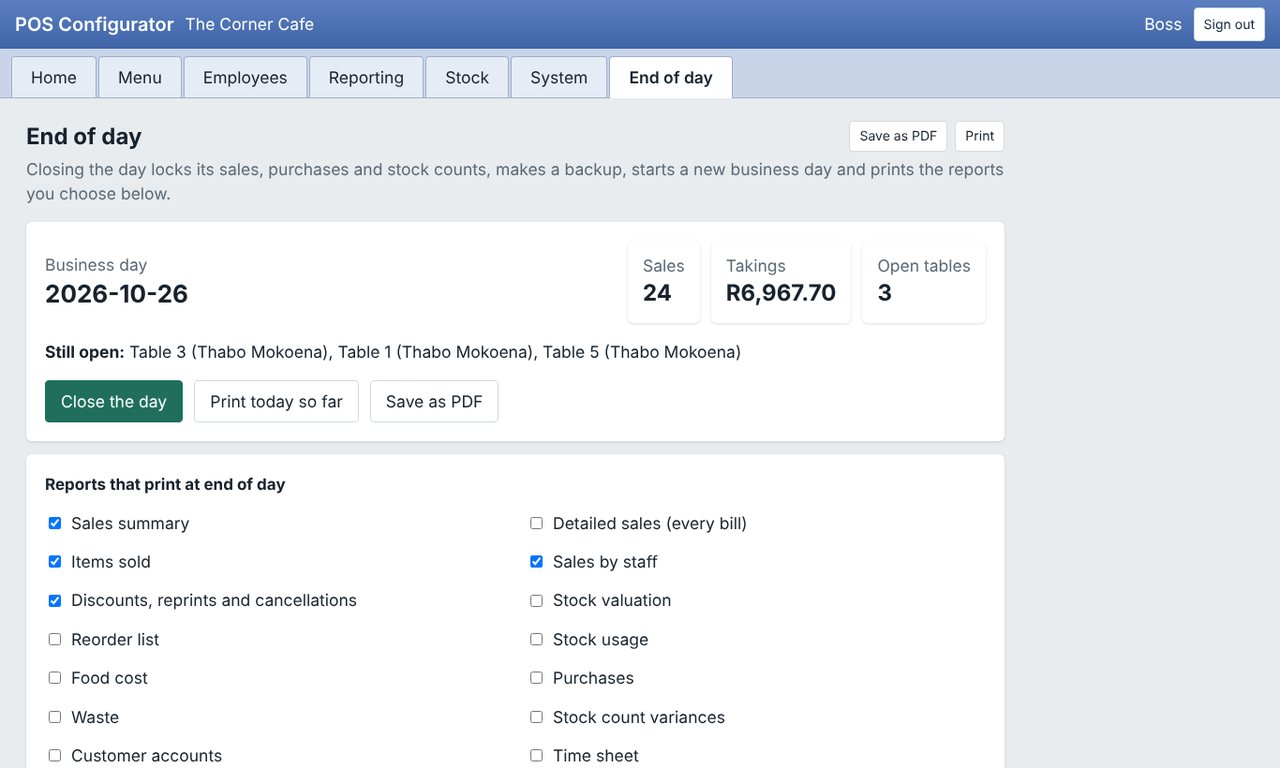
End of day screen

Close the day with confidence

The end-of-day routine locks the day, makes a backup, starts a new business day and prints the reports you choose.

  • Warns you about tables still open
  • Choose which reports print
  • Reopen a day if you need to correct it
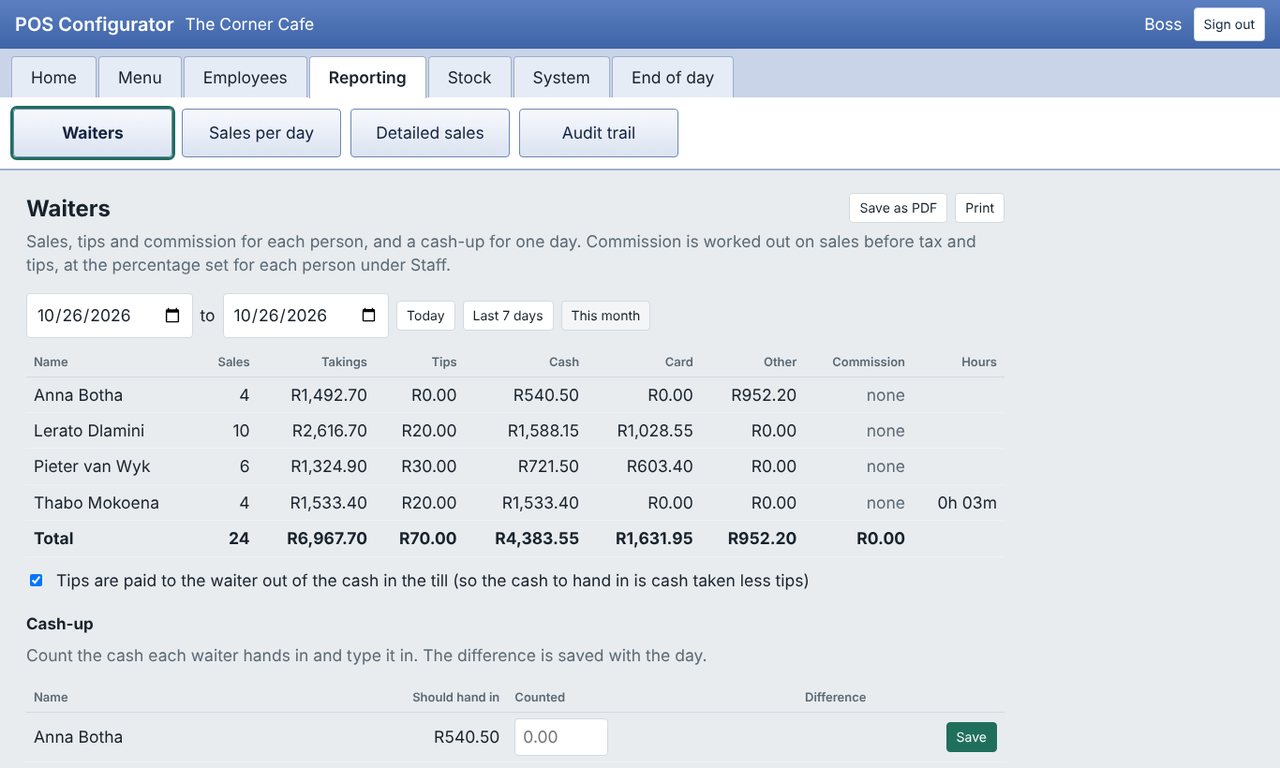
Waiters report with sales, tips and cash-up

Waiters, tips and cash-up

See sales, tips and commission for each person, and count the cash each waiter hands in.

  • Differences saved with the day
  • Time sheets from clock in and out
  • Roles and permissions per person
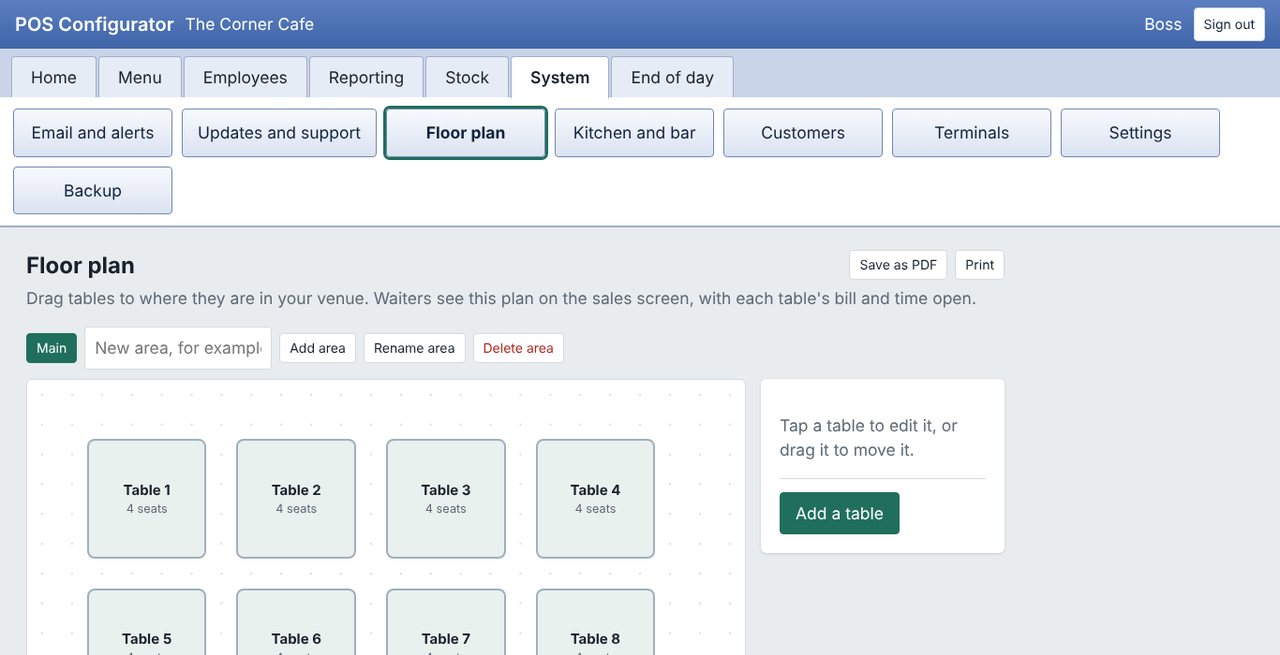
Floor plan designer

Design your own floor

Drag tables to match your venue. Waiters see the same plan on the sales screen.

  • Add areas and tables as you grow
  • Set seats per table
  • Changes appear on every device within a minute
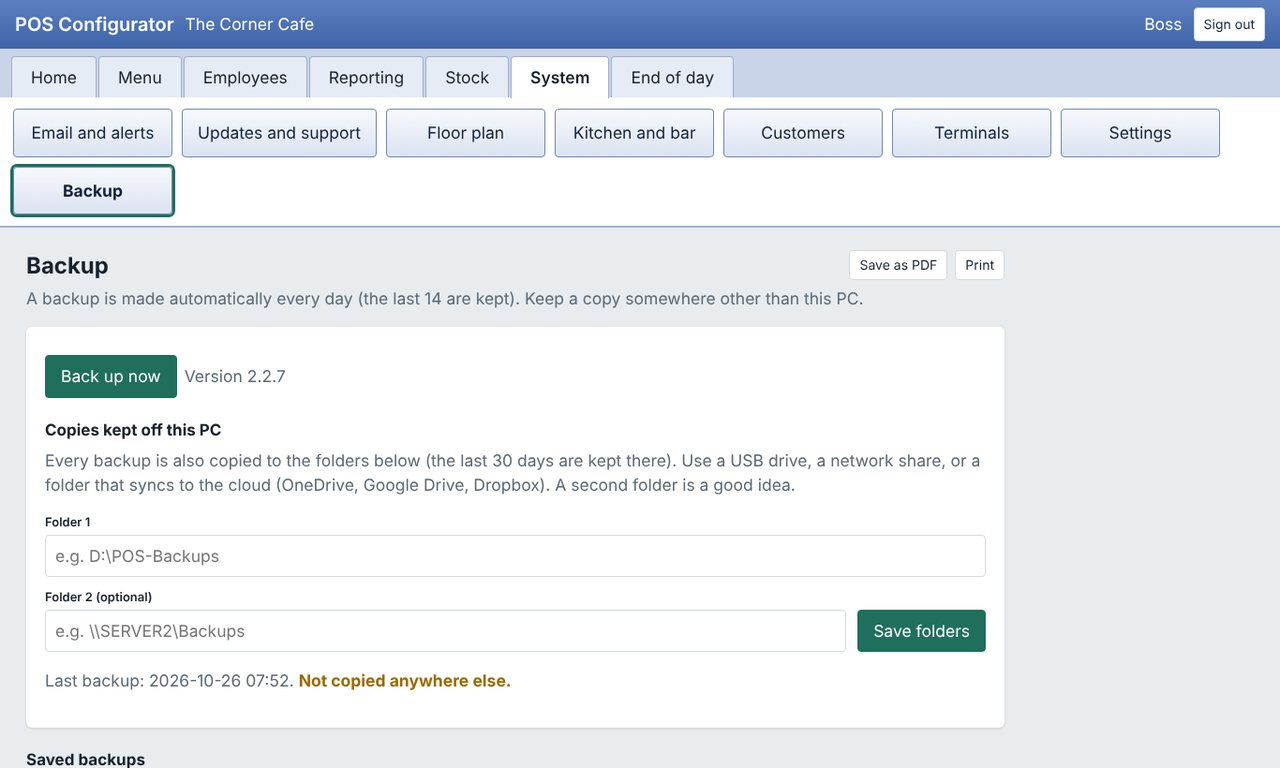
Backup settings

Your data stays safe

A backup is made every day, and you can keep extra copies on a USB drive, network share or a folder that syncs to the cloud.

  • Restore from a backup in a few clicks
  • Keeps the last 14 daily backups
  • Reminds you if copies are only on the one PC
Hardware you already own

One PC, many tills

Install Rettup POS on one Windows PC in your venue. Every tablet, phone and laptop on your Wi-Fi then becomes a till or a kitchen screen.

🖥️

Windows server PC

Runs quietly as a Windows service, so it starts with the PC and keeps running without anyone logged in.

📱

Tablets and phones

Open it in a browser, or install the Android app, which can update itself from your server.

🖨️

Kitchen and bar displays

Any screen with a browser can show the kitchen or bar tickets.

Rettup POS on a phone showing categories and a table order
Pricing

Simple pricing, no surprises

Install on one Windows PC in your venue. Every PC, tablet or phone that rings up sales counts as a terminal. Updates and fair-use support are included.

Server + 1 terminal

R300 per month
Or R3,000 for 12 months (pay for 10)
  • Everything in Rettup POS
  • Floor plan, kitchen screen, stock and reports
  • Cash-up and staff attendance
  • Updates and fair-use support included

Each extra terminal

R150 per month
Or R1,500 for 12 months (pay for 10)
  • Another PC, tablet or phone taking orders
  • Same features as the first

Setup & installation

R1,500 once-off R2,000
Remote setup, up to 3 hours of work
Launch offer for a limited time, until 31 January 2027 (normally R2,000)
  • Installation and business set-up
  • Your menu loaded (up to about 100 items)
  • Printer and devices connected
  • A training session for your staff
  • Extra time and on-site visits quoted

What support covers (full support policy): help with faults, updates, licence questions and getting stuck, by e-mail during office hours. Please check the Quick Start Guide first for everyday questions. Extra training, menu entry, on-site visits and long-running requests are quoted separately.

All prices in rand. Try it free for 30 days first. No payment needed to try it.
Get started

Up and running in an afternoon

1

Download and install

Run the installer on the PC that will act as your server.

2

Set up your business

The setup wizard asks for your business name, tax rate, menu and staff.

3

Connect your devices

Open the address on each tablet or phone, or install the Android app.

4

Start trading

Clock in, take orders and close the day. We are on hand if you need help.

Try Rettup POS free for 30 days

Download the full system and use it in your own venue. When you are happy, we help you move to a licence.

  • Windows 10 or 11, 64-bit
  • A Wi-Fi network for tablets and phones
  • Optional sample data so you can explore straight away
  • Pricing is shown above and explained before you buy
More from Rettup

IT support for the rest of your business

Rettup Solutions has supported businesses across Pretoria for over 20 years. We can set up the network, Wi-Fi and hardware your POS runs on.

🌐

Network infrastructure

LAN, WAN, Wi-Fi and fibre connectivity that keeps your tills connected.

☁️

Cloud solutions

Migration, management and optimisation on AWS, Azure and Google Cloud.

🔒

Cybersecurity

Firewalls, endpoint protection, security audits and staff training.

🖥️

Hardware support

Procurement, installation, repair and maintenance of IT hardware.

💻

Software and development

Custom software, websites and system integrations.

🛠️

Consulting and support

Helpdesk, on-site assistance and strategic IT advice.

65+Clients served
20+Years experience
99%Satisfaction
★★★★★"Rettup Solutions completely transformed our network infrastructure. Fast, professional and they actually explain what they're doing. Highly recommended."Riem AccountantsAccounting Firm, Pretoria
★★★★★"Willem and his team sorted out our entire office setup in one day. Everything works perfectly and the ongoing support is always prompt."Marelize EsterhuyseSmall Business Owner
★★★★★"Best IT support company we've used. Transparent pricing, no surprises, and they genuinely care about getting it right. Our go-to for everything IT."Local BusinessMontana Park, Pretoria
Talk to us

Let's get your venue running

Ask for a demo, a licence quote or help with an existing system.

Rettup POS

Demos, licence quotes and support for the point of sale.

IT services

Networks, hardware, cloud and general IT support. Based in Montana Park, Pretoria.